05 May 2015

The Moments when I'm addicted to Starbucks

Everybody knows Starbucks...the biggest coffee shop chain in the world. Before I went to Taiwan almost 3 years ago, I've never every buy any kind of products from Starbucks. Because like most of the people said in Indonesia, Starbucks is only for rich people. Of course because it's expensive for a cup of coffee. My mom even can make more delicious coffee at home with cost less than 10.000 rupiah or less than $1. But, it changed now...

My impression when I saw a LOT of Starbucks shop in Taiwan is...weird. Why...there are so many Starbucks in Taiwan? Why oh Why? It's weird because Taiwanese has 7-11 and FamilyMart where we can find coffee too (the taste also nice for me), and these stores can be found in almost anywhere.

So... I decided to try one cup of coffee in Starbucks near my campus...I think 2 years ago. When I saw the price, I thought that it's not expensive when I use Taiwan Dollar. But, when I compare the price to Rupiah, of course it's expensive. I realized that is because of the culture where people at. Let me give you an example.

Green Tea Latte (which I like the most) has price NT$ 135 for Grande or Medium size. It's equal with Rp 54.000 if we use Rp 400 currency per NT$1. But, when I bought it in Starbucks Indonesia, the price is almost Rp 70.000 as far as I remember. Using that price in Indonesia...it's crazy! Many people will not going to buy with that price. That's why Indonesian said it's only for rich people.

But, when we talk about the culture in Taiwan, $135 is not expensive for a cup of coffee or latte. They don't have any coffee plantation and they have to import first from Indonesia or Africa, not like in Indonesia where we can find cheap good quality coffee almost anywhere. Taiwanese also like to hanging around with their friends after school or work, and Starbucks is the place. Because not many cafe can be found in Taiwan, except big cities like Taipei and Kaohsiung.

At first, I didn't have any addiction with Green Tea Latte (I only buy this in Starbucks). But after I married and stay in Hsinchu City, I've became bored all the time and my destination to waste my time is in Starbucks near my home. hahaha I already tried several other menu but I only like Green Tea Latte. I don't know why. Maybe because I found out that Indonesian coffee is better rather than drink instant Indonesian coffee in Taiwan. hahaha

My addiction of Green Tea Latte became worst because I usually go back and forth from Hsinchu to Taipei when I have class... and I don't like to use bus because I will get a seasick (or roadsick? haha)...and I need something hot. In the bus station, one thing that I can found faster is Starbucks. =.="

That's why almost every time I went to Taipei, I always buy Green Tea Latte to make my stomach and head better.

I think it's not like an addiction because if I didn't drink it, I would not going to have a headache or something like that. But, maybe it's because my need to stay awake after long trip using bus and spent my day when I didn't go to school.

I remember when my sister ever said to me that I'm crazy to buy Starbucks in Indonesia. =.=" She said "you're wasting your money". Yeah, sometimes I agree with that when I'm in Indonesia. But when I'm in Taiwan, I will say to her I don't agree. Because I will buy when I need it, not to buy this all the time. It's impossible for me to buy any kind of food or drinks when I don't have money, right? haha

So...the point is...my addiction is not an addiction. It's a need of tea with milk (a.k. latte) not coffee.
02 May 2015

My Productivity App in May

May is coming and spring is almost end to the start of summer. But, it doesn't make me lazy to do something, even outside world is waiting for me to explore the beauty... :p haha

So, in the first post of this month, May, I'm gonna tell you guys what kind of productivity apps I've been used and still gonna use these in this beautiful month.

INBOX

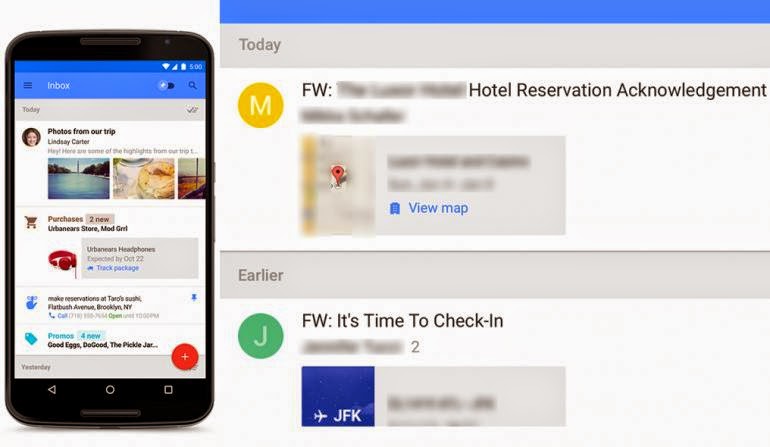
If you use Gmail for your e-mail service, I think you probably notice that these days (I'm not sure start when) Google try to give you notification in your Gmail window to try to use Inbox. Inbox is another Google product that allows emails to be bundled based on the purpose. So, for example, if I buy something online, sometimes the conformation will be sent to e-mail, then Inbox will bundle this email into one folder called Purchase. The same case for travelling, Inbox will bundle your itinerary in the Travel folder. Inbox also have a functionality that help people notice which email should be seen first using "pin" or remove the seen email using "done", even "snooze" the email to be read later, just like alarm.
This app is very useful for me now. Because it can bundled everything in my inbox and I can easily manage what kind of email which is important and not important. But, if you want to use this app, you have to be invited first by your friend. Actually I'm not sure about this because when I first use this app, I don't have to be invited by my friend, but when my husband wanna tried it, I had to invite him first in order for him to use the app.

FOCUS@WILL

Have you ever experience the feeling of desperate to focus on something? I think many people have this kind of experience. That's why people need something that can make them focus. Music is one of the solution. But, not "jedug jedug" music (if you know what I mean) hahaha I like to listen an instrumental music, specifically guitar. Yeah sometimes, I will listen to Sungha Jung in YouTube. But, if I use YouTube in my tab, I can't open another app to do my tasks. So, there is this app called Focus@Will that will provide you with kind of music do you like. Not only acoustic but also something like piano recital, mozart songs, etc.
It's proven (at least to me) that music can help someone to focus and do the job faster and become more productive. But, you have to pay if you want to use this app for more than 1 month. Instead, you can still try it using 30 days trial. After that? let's find another app. haha

POCKET

Pocket is an app that can help you store websites links, videos, pictures, etc when you want to read it later, offline. So, for example... I like to browse a lot, sometimes I will got into a moment when I can't read the article and want to store the link in one click. And of course, if it's possible, read it offline. Pocket provides this need for people like me who likes to store many information online and to be read offline later maybe at home. And also, this app can be installed in phone, tablet, and computer.


EVERNOTE

I like this app a lot!! Because this app can help me store many notes, todos, pictures, websites links, videos, etc then I can share those files to my friends.

Because this app is using cloud service, the synchronization between one device with another is fast and no need much storage to save all notes we have.

It's good to save many meeting notes, research ideas, summary of the paper, todos for project (i dn't like t put my personal todos in here), websites offline page (just like pocket but i prefer pocket more than evernote website clipper), recipes, travel pictures, etc.

WUNDERLIST

Another app that can help me store and keep on track of my todos is this app called Wunderlist. I can also put my dreams or my monthly accomplishment, books to read, movies to watch, groceries list, etc. Because, this app put lists on the folders. You can download it in your mobile phone, tablet,or computer. The todos also can have deadline and can be repeated for several days, months, or anytime you want. You can also share your folder of lists to your friends, it's good for project list, and also you can chat on each other.

That's all for My May's App and hope it can help you to find perfect productivity app for you. Remember, there are a lot of apps in the store, you can manage to try one but then realize it's not good at all for your productivity. My suggestion to you is try at least for a week and if it's not good, try another one. Maybe my apps for this month are not suitable for your needs, it's fine, just find another app that similar but based on your needs.

Jazakallahu Khairan Katsiran. ^^

28 April 2015

Analyzing 2-mode Network using Pajek Part 3


Before in Part 1 and Part 2 of this series of Analyzing 2-mode network using Pajek software I already told you about how to simplified a network and find centrality of a network. Now in this part, I wanna tell you about how to do hierarchical clustering in a network.

Using simple human language, cluster is something that grouping several people that have same characteristics. So, it can be easier to find out something in a large social network.


First, open your simplified network


Second, follow this instruction :
Cluster - Create Complete Cluster
Operations - Network + Cluster - Dissimilarity* - Network based - d5 Correct Euclidian 
Fill the pop-up window with 0
Save the file which is EPS file that contains dendogram of the clustering
Open the dendogram file using Ms. Word.

This dendogram explain how people clustered based on their future dreams.


But you can also see the hierarchi through Pajek with clicking File - Hierarchy - Viet/Edit . Then, a small window of hierarchy will pop-out and you can drop down the root and see there are two clusters there.


To close the tree, you can click Edit - Change Type in the viewing hierarchy window.


To know the result, you have to do the partition first with clicking Hierarchy - Make Partition. Then, you can draw the network with Draw - Network + First Partition


The result is like the picture below. The network clustered into two clusters. Each cluster presents people who has the same future dreams.


Actually, a network with two clusters can be shrunk. Shrinking a network discloses how clusters are linked to each other and how good the clustering result is.

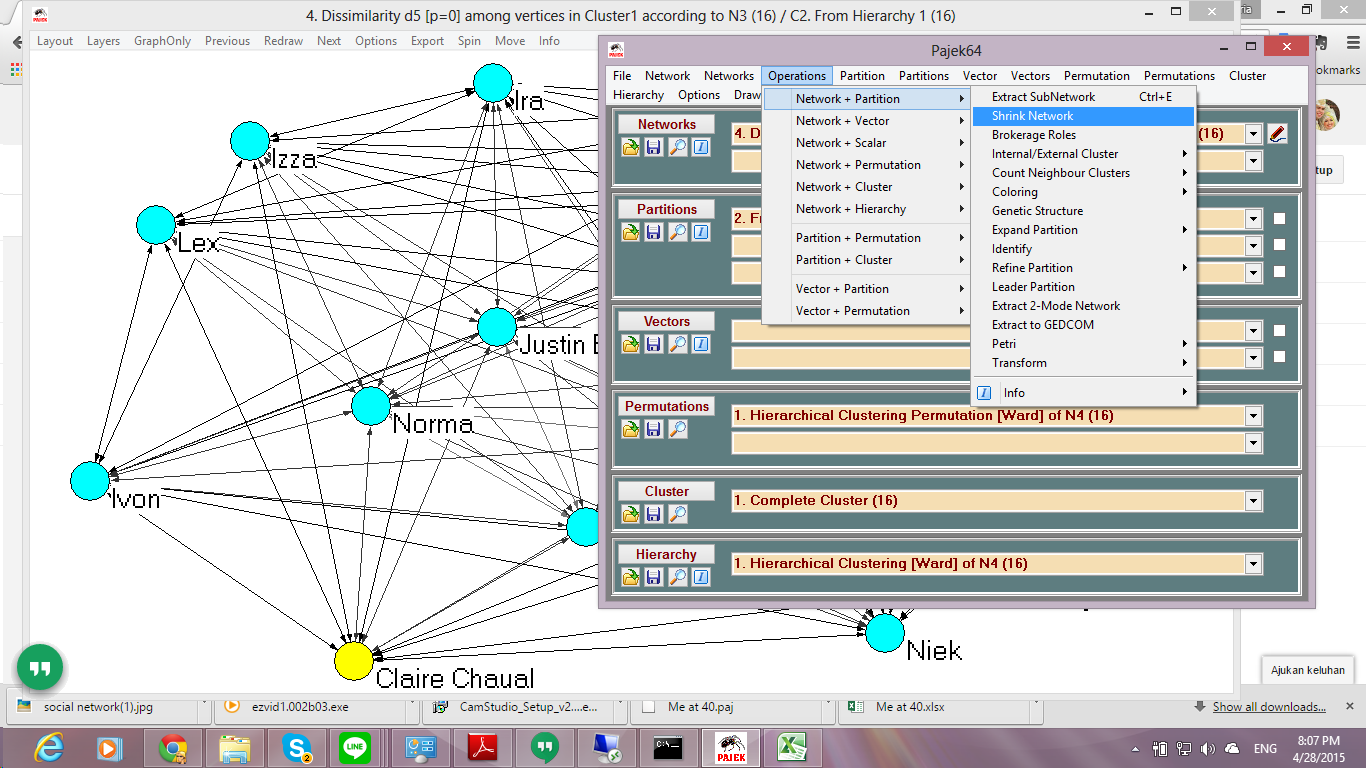
You can do that by click Operations - Network + Partition - Shrink Network


A small window will pop-up and you have to fill the minimum number of lines between clusters and how many clusters that will not be shrunk.


After you click OK, you can draw the Network + First Partition and the result is like this


You can see in the shrink network results that Claire groups have links with other groups. For example Claire wants to be proud parents and that dream also in Niek group's dreams.

Okay... that's for now about the analyzing 2-mode network using Pajek. Hope it can be useful for you and if you have any questions you can comment down below. :)

Thank you for reading this article  ^^


Analyzing 2-mode Network using Pajek Part 2

Before in Part 1, I give some introduction about Pajek and how to change 2-mode network into 1-mode network before do the simplified network. So, in this Part, I will show you how to do the centrality.

Centrality is a key concept in social network analysis. It is commonly used to measure the importance or power of a node. The concept is  based on the assumption that the position of a node affects its influence to the other nodes in the networks.

To make it simple, if you have a friend that have more friends than you and her/his position in your network is influential, it might be possible that if he/she do something, other people will people. It's just the example.


There are several centralities, which are:

1. Degree Centrality
which means the one who gather more friends, he/she is more influence.
Example :
There is a prom night and I need help from my friends. Only true friends that will come to help

2. Closeness Centrality
which means the one who has in average closer relationship with all other person is more important.
Example :
If there is a vote for school organization chairman, favoring votes come also from indirect friends.

3. Betweenness Centrality
which means the one who is more able to invite more (through multiple channels).
Example :
If there is a prom, the one who able to invites more hot girls  is more important.

4. Bonacich Centrality and Alpha centrality
which means who your friends are is actually quite important
Example :
If there is a big fight in school between two people. But the one who can escape is the one who has higher relationship with teacher.

In here I only want to show how to measure degree, weighted degree, closeness, and betweenness centrality in network using Pajek.

Open your simplified network like I told you before in the Part 1. 


But if you think it's complicated, you can simplified it again. My network is become like this


Then, do the Centrality with perform this action :
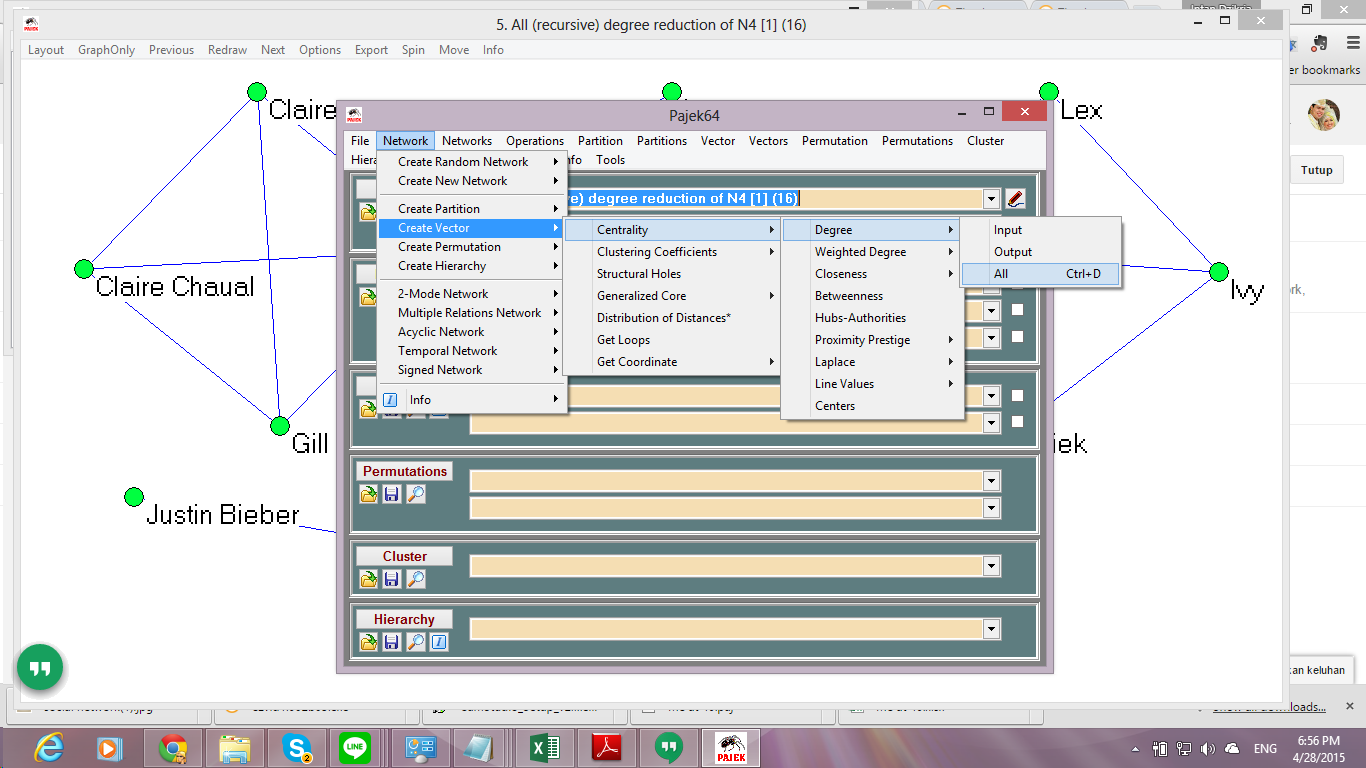
Network - Create Vector - Centrality - Degree - All (degree centrality)
Network - Create Vector - Centrality - Weighted Degree All (weighted degree centrality)
Network - Create Vector - Centrality - Closeness - All (closeness centrality)
Network - Create Vector - Centrality - Betweenness (betwenness centrality)


To draw the network you have to click on Draw - Network + First Vector
You can see in here the results between one centrality and another are different based on what centrality method we want to know.

 Degree Centrality

Weighted Degree Centrality 

Closeness Centrality


Betweenness Centrality

But after see those drawing, how can we know the centrality or the most influence people in the network? You have to export the results using this command Tools - Export to Tab Delimited File - Current Vector - Save File


The saved files are .txt file that you can open using Notepad.


To make it easier, you can move the results to Excel and sort the results for each centrality from highest degree to lowest degree. You can see in the picture below that the results shown people who has high influence in the network are the ones who has yellow color (16 people). But why the result of betweenness centrality is different?


Actually you can connect this result into what each centrality means. Let's break down for each centrality.

1. Degree Centrality and Weighted Degree Centrality
If there's a prom night in school, true friends will come to help. So, in this case 16 people in the yellow color are the people who most likely help their friends in need.

2. Closeness Centrality
If there is a vote for school organization chairman, favoring votes come also from indirect friends. So, in this case if you are one of the candidate, you can ask these 16 people to ask their friends to vote you.

3. Betweenness Centrality
If there is a prom, the one who able to invites more hot girls is more important. But, in this case the degree of all people are 0. I guess no one can invite hot girls/ boys hahaha

But because the case is about students and their dreams in the future, you can connect the result into something in the future. Like for example, they can be marriage partner. For example because Justin Bieber and Norma are most likely have the same preference in their future dreams, they can be marriage partner because they can influence each other.

Hope it can help you and I'm going to continue into Part 3. :)

Analyzing 2-mode Network using Pajek Part 1

This semester I got to learn something interesting called Social Network Analysis. At first I thought it's like social network kinda things, e.g. Facebook, Twitter, etc. But, actually those are social network website and the case for the analysis.

Let me tell you simple thing to think of. You have friends in Facebook right? And your friend have mutual friends with you, and your other friends too. These can build a network, called social network. This network can have many kind benefit, for example who are your friends that have highest influence in your network, so if there's any event you can ask them to tell your friends.

There are two kinds of network, 1-mode and 2-mode network. 1-mode network only have 1 event/actor. For example, your friends network only have your friends' name there. But, 2-mode network has 2 variables, for example your friends' name and their hobbies.

In this article, I will show you how to analyze 2-mode network. This article consists of several parts which are how to dimplify a network, find centrality, and do a clustering.

There are many software for social network analysis, but because I just learn about this software, Pajek, I will use this software instead. Pajek is a free software that you can download here.

First, Open your Pajek and click File - Pajek Project File - Read to read you .paj file
If you don't have .paj file you also can open .net file with clicking File - Network - Read


After you open your file, it will open a Report Window that shows you everything you've done using Pajek. Somekind like a Log windows.


Second, Draw your network with clicking Draw - Network


Your network will be shown in the drawing window. You can change the drawing using several algorithm provided in the Pajek. Just clik on Layout - Energy - Kamada Kawai - Free or Layout Enegery - Fruchterman Reingold - 2D


Another drawing will be like this. Every time you did the the drawing algorithm, it will show different results.


So, because it's a 2-mode network, you have to make it into 1-mode network first before continue to further analysis. Because it will show more comprehensive result from 2 variables (actor and event).

Third, Change the 2-mode to 1-mode network with 
Network - 2 Mode Network - 2 Mode to 1 Mode - Rows (establish event projection)
Network - 2 Mode Network - 2 Mode to 1 Mode - Column (establish actor projection)

The difference between Rows and Column is in the projection. So, for example in here I have a network that the actors are students's name in the class and the events are the dreams. Vice versa.


After the changing into 1-mode network, if I choose the event projection, the drawing will only shown the relation of the students.


But, if I choose the actor projection, the result is only the dreams of the students.


Fourth, Simplify the Network

Let's see the event projection instead because it's more complicated than the actor projection. Because it's too complicated what we want is to make it simpler, but how?

We have to know first the value of each line. The meaning behind it is that one person can have more than 2 dreams, right? but teacher asked students to choose their dreams no more than 4. So, we have network that shown students' choice between 2 until 4 choices. And if we want to make the network simpler, it's up to us the minimum degree of the network.

Okay for example, I want to remove lines that lower than 3. It means, the network only shown students that have 3 and 4 choices of dreams.

To do this, perform this action in the Pajek. Click on the Network - Create New Network - Transform - Remove - Lines with Value - Lower Than


A small window will pop up and insert your threshold value. Mine is 3. So, I type 3 in the box. Then click Ok. There will be another window appear but just click Ok.


When I draw the network, it will be like this. You can see there are several vertices or my friends in the class who have no line or link to another vertices, right? We want to make the network simple, so why not we reduce it?


To reduce the vertices that have no links, you have to perform this action Network - Create New Network - Transform - Reduction - Degree - All

Degree in here is how many links the vertices have. For example, in here the minimum degree I want in my network is 1. Because Sherry and Pietsia have 0 degree, they will be removed from the network.


Input the minimum degree you want, for me I want 1. There will be another window that will pop-up and just click Yes.


When I draw the network, the vertices that have 0 degree is no longer exist in the network.


To see the line number, you can click Options - Lines - Mark Lines - With Values in the drawing window.


Fifth, Save your Network

Finally, don't forget to save your simplified network for further analysis like for clustering because you don't want to perform the same actions from time to time right?

To save your network, you can do click Save button in the Networks section.or click File - Network - Save.

I will go on to the next part of the Pajek tutorial. If you have any question about this part, please comment below. :)

Hope this post help you. ^^

You can see the next part in this link